
Light Show Creator for Tesla
Bamboo GameAuto & Vehicles
3.225.00 Reviews
- Version
- 3.7.01
- Installs
- 10.00K
- Age Rating
- Everyone
Screenshots
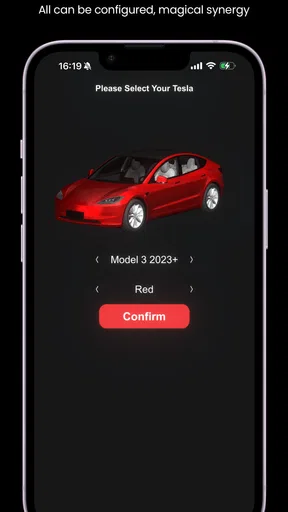
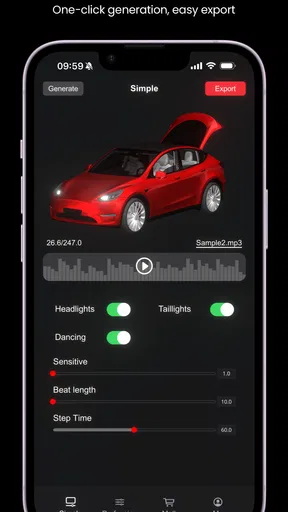
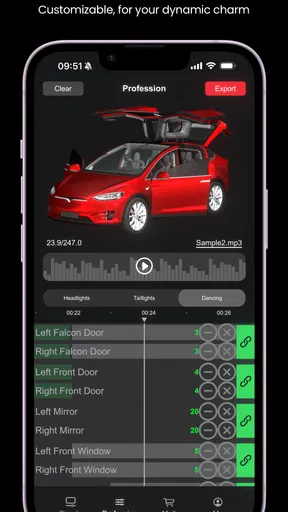
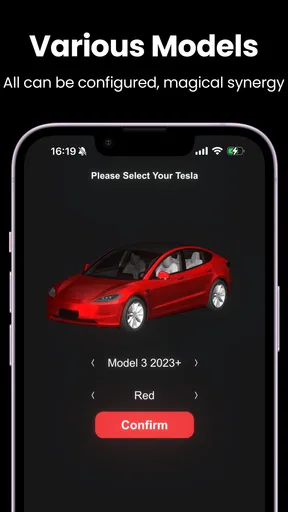
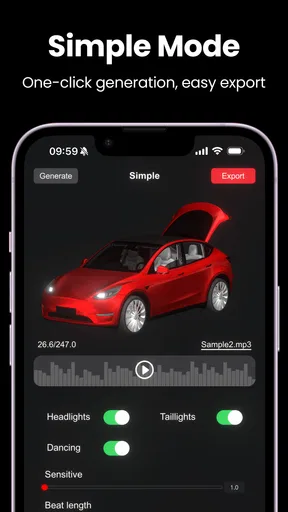
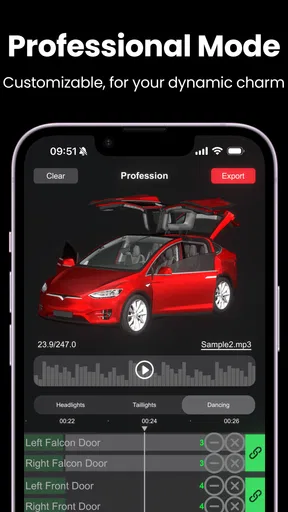
Our Review of Light Show Creator for Tesla
 Analysis by Appyee
When I first tried Light Show Creator for Tesla, I approached it as a small utility rather than a full vehicle-management tool. Its purpose is narrow but appealing: it lets you build a custom Tesla light show instead of settling for a preset routine. That makes it especially interesting in a household where several people share the same car and want to contribute ideas without turning every light-show session into a technical project.
The app comes from Bamboo Game and sits in the Auto & Vehicles category. It is free to install, with optional in-app purchases priced from $9.99 to $19.99 per item. The age rating is Everyone, which fits the creative, non-driving nature of the tool, although an adult should still handle anything involving a parked vehicle, a phone, or a public demonstration. My overall impression is mixed but positive: the concept is fun and more personal than the usual alternatives, while the modest average rating of 3.2 from roughly 71 ratings suggests that the experience may not feel equally smooth for everyone.
Making a shared Tesla light show feel manageable
The most enjoyable way to use this app is with a clear, small goal. In my experience, a household gets more from it by planning a short idea together than by opening it with no plan and expecting an impressive result immediately. One person can choose the music or mood, another can suggest the timing, and someone else can take responsibility for checking the final result beside the car.
That shared-device scenario also reveals an important boundary. Light Show Creator is not a general family dashboard, and I would not treat it as a place where every household member should freely change the same project without coordination. On a shared phone, the safest routine is to decide who is editing, who is reviewing, and who is responsible for the final launch. That simple division avoids the confusion of several people changing a sequence at once.
I found the app most suitable for a parked-car occasion: a birthday gathering, a driveway experiment, or a small meet-up where everyone already understands that the vehicle should remain stationary. It is less suitable for casual use while someone is preparing to leave. The creative part deserves attention, and the vehicle-related part deserves a separate moment when nobody is trying to drive, load luggage, or manage children.
What the app adds beyond a normal Tesla light show
The obvious advantage is personalization. A built-in light show is convenient, but it gives you a finished performance. A creator app changes the activity from watching to arranging. That difference matters when the goal is to make a routine feel connected to a particular song, celebration, or inside joke.
The less obvious benefit is that it encourages people to think in sequences rather than just effects. Even if you are not musically trained, you can approach the project in layers: establish a recognizable opening, create a middle section with more movement, and finish with a visual moment that feels intentional. That structure is more useful than randomly adding changes until the result becomes busy.
I also recommend keeping a written outline before editing. Note the opening cue, the main transition, and the ending cue in plain language. This is a practical workaround for a creative tool that can otherwise invite endless tweaking. A household member who is not operating the app can still participate by reviewing that outline and pointing out where the show feels too long, too repetitive, or difficult to follow.
Setting up without letting the project sprawl
Light Show Creator is available for devices running Android 6.0 or later, and the current version is 3.7.01. Those details make it accessible to many older phones, but compatibility alone does not guarantee a pleasant editing session. A larger screen is generally easier for arranging creative work, while a phone is more convenient when you are standing near the vehicle. I would prepare the show indoors and use the phone near the car mainly for the final check.
The free entry point makes experimenting easy, but the optional purchases change how I would approach the app. I would first decide whether the basic workflow feels comfortable before spending money on extras. The listed purchase range is from $9.99 to $19.99 per item, so this is not something I would buy impulsively for a single five-minute experiment. A shared household should also agree in advance about who is allowed to make purchases, particularly if the same device is used by younger family members.
That is not a criticism of the app alone; it is simply good practice for any creative utility with optional paid items. The person designing the show may not be the person managing the household budget. Keeping those roles separate prevents an enthusiastic experiment from becoming an unexpected purchase.
Before involving a group, I would run a private test. Prepare the sequence, check that the intended audio or timing behaves as expected, and only then invite everyone outside. This two-stage workflow is one of the most useful ways to reduce friction. A crowd is patient when it is watching a planned reveal; it is much less patient when the organizer is still trying to solve basic setup problems beside the car.
Coordination matters more than technical enthusiasm
A custom light show works best when one person acts as coordinator. That does not mean one person has to make every creative decision. It means there is a final owner for the project: someone who knows which version is current, confirms that the car is ready, and decides when the show will begin.
For a family or group of friends, I would use a simple handoff. The editor creates the sequence, a second person watches a preview or reviews the plan, and the coordinator performs the final vehicle-side check. If the app requires a particular order of actions, the coordinator should follow that order without several people interrupting. This is especially valuable when children are present, because excitement can quickly turn into repeated taps, accidental changes, or people standing where they should not.
Another useful habit is naming versions in ordinary language, such as “birthday opening” or “short driveway test,” rather than relying on memory. Even without assuming any special account or collaboration system, this makes shared use easier because everyone knows which idea is being discussed. It also prevents the household from treating an unfinished experiment as the final performance.
Timing is another trade-off. A longer show may seem more ambitious, but it asks more from the audience and gives more opportunities for a transition to feel weak. I prefer a compact sequence with a clear identity. If the group wants a second attempt, it is better to make a deliberate alternate version than to keep extending the first one.
Age, trust, and the limits of a shared device
The Everyone content rating makes sense because the app is centered on vehicle lighting and creative editing rather than mature subject matter. Still, an Everyone rating does not mean every part of the experience should be unsupervised. The relevant risks here are practical: access to a shared phone, optional purchases, and behavior around a parked vehicle.
I would let younger users contribute ideas, choose a theme, or review the order of a show. I would keep final editing, purchase decisions, and vehicle-side operation with a trusted adult. That arrangement respects the creative role of children without pretending that an age rating replaces household rules.
Trust also matters when several people use one phone. If the app is installed on a device that contains other personal information, I would avoid handing it around casually during a gathering. The app itself may be simple, but the phone is not necessarily simple. A supervised turn-based approach is more sensible than allowing everyone to explore unrelated areas of a shared device.
For families with teenagers, the best conversation is probably about responsibility rather than restriction. Explain that the show is for a stationary car, that the driver should not be distracted, and that a purchase requires permission. Those boundaries are more useful than assuming the tool is automatically harmless because its content rating is suitable for Everyone.
How it compares with the usual alternatives
The most obvious alternative is using Tesla’s own built-in light-show experience without creating anything custom. That option is better when speed and predictability matter. If you want to demonstrate the car’s lights immediately, a preset requires less planning and gives you fewer creative decisions to manage.
Light Show Creator is the better choice when the point is ownership of the idea. It gives a household a reason to collaborate, and it can turn a familiar vehicle feature into a small project. The trade-off is that custom work introduces more chances for confusion. You need to think about structure, timing, testing, and who is responsible for the final result.
Another alternative is editing audio or video separately and treating the car as the final display. That approach may offer more control in a dedicated creative program, especially for someone already comfortable with music production. However, it can also create unnecessary complexity for a casual Tesla owner. This app is more appealing when you want a focused tool rather than a full editing workstation.
I would skip it if your main requirement is remote vehicle control, trip planning, charging management, or a complete Tesla companion experience. Its identity is much narrower. It is a creative light-show utility, not a replacement for the broader tools people use to manage daily ownership.
Practical ways to get a cleaner result
My first tip is to build around one recognizable idea. A single theme gives the show a stronger personality than a collection of unrelated effects. For a household event, that could be a birthday mood, a favorite musical style, or a color concept everyone understands. The point is not to make the sequence complicated; it is to make it coherent.
My second tip is to test from the audience’s position, not only from the editor’s perspective. A sequence that looks logical while you are constructing it may feel too fast or unclear when viewed from several steps away. Ask one person who did not create it to describe what they noticed. Their reaction can reveal whether the main moment is visible or whether the show is simply a stream of changes.
My third tip is to keep a fallback plan. If the custom sequence does not behave as expected, do not let the entire gathering depend on troubleshooting. Have a simple alternative ready, whether that means postponing the custom version or using the car’s ordinary light-show option. This is particularly important when the event includes guests who did not agree to wait through a technical session.
A fourth useful habit is to separate creative review from vehicle safety. Do all detailed editing away from the car, then move outside only for the final confirmation. That reduces distractions and makes it easier to stop if the surroundings are unsuitable. The most polished result is not worth rushing around a vehicle or making the driver deal with a phone at the wrong time.
Who will enjoy it and who should pass
I can recommend this app to Tesla owners who enjoy tinkering and want their car to participate in a personal event. It is also a good fit for households that like making small projects together. The free installation lowers the barrier to trying the idea, while the focused purpose keeps the learning curve more approachable than a general-purpose audio or video editor.
I would be more cautious recommending it to someone who wants instant results with no editing. The average rating of 3.2 indicates that the experience has not been universally smooth, and that is consistent with the nature of a creator tool: the more control an app tries to offer, the more room there is for workflow frustration. If you dislike testing, revising, or coordinating with other people, the standard built-in option may suit you better.
I would also pass if the car is used almost entirely for practical transportation and there is no realistic occasion for a parked light show. In that case, the app may remain unused after the initial curiosity fades. Its value comes from the activity around the vehicle, not from everyday driving utility.
My household verdict
After looking at it as a shared-device app rather than a novelty download, I see Light Show Creator for Tesla as a specialized but worthwhile experiment. Bamboo Game has focused on a feature that can be surprisingly personal when people are willing to plan it. The strongest experience comes from a clear owner, a short sequence, a supervised device, and a sensible test before guests arrive.
The app is free, rated for Everyone, and supports Android devices from version 6.0 onward, so trying it is relatively accessible. At the same time, the optional purchases mean I would not hand the phone to a child without agreeing on purchase boundaries first. I would also avoid presenting it as a universal Tesla tool, because it is not designed to replace the wider collection of apps used for vehicle management.
My final recommendation is simple: use it when the light show itself is the event. Invite the household to shape the idea, keep editing responsibilities clear, and treat the parked-car test as a planned step rather than an afterthought. The best reason to install it is not convenience; it is the chance to turn a Tesla feature into a small shared creation. If that sounds enjoyable, Light Show Creator is worth exploring. If you only want a quick preset with no coordination, the usual built-in alternative will probably be the better fit.
Verdict
Strengths of Light Show Creator for Tesla
- Creates custom light shows with an intuitive, visual editor.
- Lets you preview and fine-tune timing before sending a show to the car.
- Supports creative combinations of Tesla lights, sounds, and actions.
- Makes it easy to save, duplicate, and reuse show projects.
- Useful for personal celebrations, events, and Tesla community sharing.
Limitations of Light Show Creator for Tesla
- Requires a compatible Tesla model and supported vehicle software.
- Some features may depend on the car’s hardware configuration.
- Shows can take time to transfer and prepare before playback.
- Advanced customization may feel overwhelming for first-time users.
- Running light shows can drain the vehicle’s battery more quickly.
Similar Picks in This Category
View All
Android Auto
Google LLC4.1

maxim — order a taxi & food
PT. SITO4.7

Штрафы ГИБДД: проверка с фото
Pays LLC – Штрафы ГИБДД4.7

Номерограм – проверка авто
Авто Ассист4.8

Дром Авто
Дром4.9

Frequently Asked Questions
What is Light Show Creator for Tesla?
Light Show Creator for Tesla is a tool designed to help Tesla owners create, edit, and prepare custom light shows for compatible vehicles. It typically lets you arrange lighting effects, timing, and song cues before transferring the finished show to a USB drive for use in the car. The app is aimed at creative users, although the exact features and workflow may vary by device and Tesla model.
Which Tesla vehicles are compatible with Light Show Creator?
Compatibility depends on the Tesla model, software version, and the specific light-show features supported by the vehicle. Newer Tesla models generally offer better support, but not every lighting effect or custom sequence will work on every car. Before downloading, check the app’s current compatibility information and compare it with your Tesla model, year, firmware version, and available exterior lighting hardware.
Do I need a USB drive or additional equipment to use the app?
In most cases, creating a show only requires the app, but playing a custom show in a Tesla usually involves a properly formatted USB drive. You may also need an audio file that meets the required format and a folder structure recognized by the vehicle. The app itself does not normally add lighting hardware, so your Tesla must already support the relevant light-show functions.
Can I use my own music and share custom light shows?
Many users choose personal music when designing a light show, but support depends on the app’s accepted audio formats and Tesla’s playback requirements. You should also make sure you have permission to use any copyrighted track, especially if you plan to publish or share the show online. Exporting and sharing may require additional steps, such as copying files manually or following a specific naming convention.
Is Light Show Creator for Tesla safe to use?
The app is generally intended for preparing entertainment sequences rather than controlling a Tesla while driving. Light shows should only be tested when the vehicle is parked in a safe, legal location, and users should follow Tesla’s instructions at all times. Avoid modifying vehicle software or using unknown files. Since third-party apps can change over time, review permissions, developer information, ratings, and recent updates before installation.
